
CareerMap for students
Find your direction. Learn your way. Practise with Luma.
CareerMap helps students discover careers, understand how they learn, organise study material, create mock tests, get guided homework support and prepare for interviews — all in one personal student platform.

Career Mapping
Understand yourself before choosing your future.
Career Mapping helps students explore interests, strengths, confidence, values and readiness so career decisions become clearer and less random.
Interests and strengths
Understand what naturally pulls your attention and where your stronger patterns may sit.
Career confidence
Notice where you feel ready, uncertain or in need of more exposure before choosing a direction.
Readiness and next steps
Turn your CareerMap evidence into practical actions you can test, research or practise next.
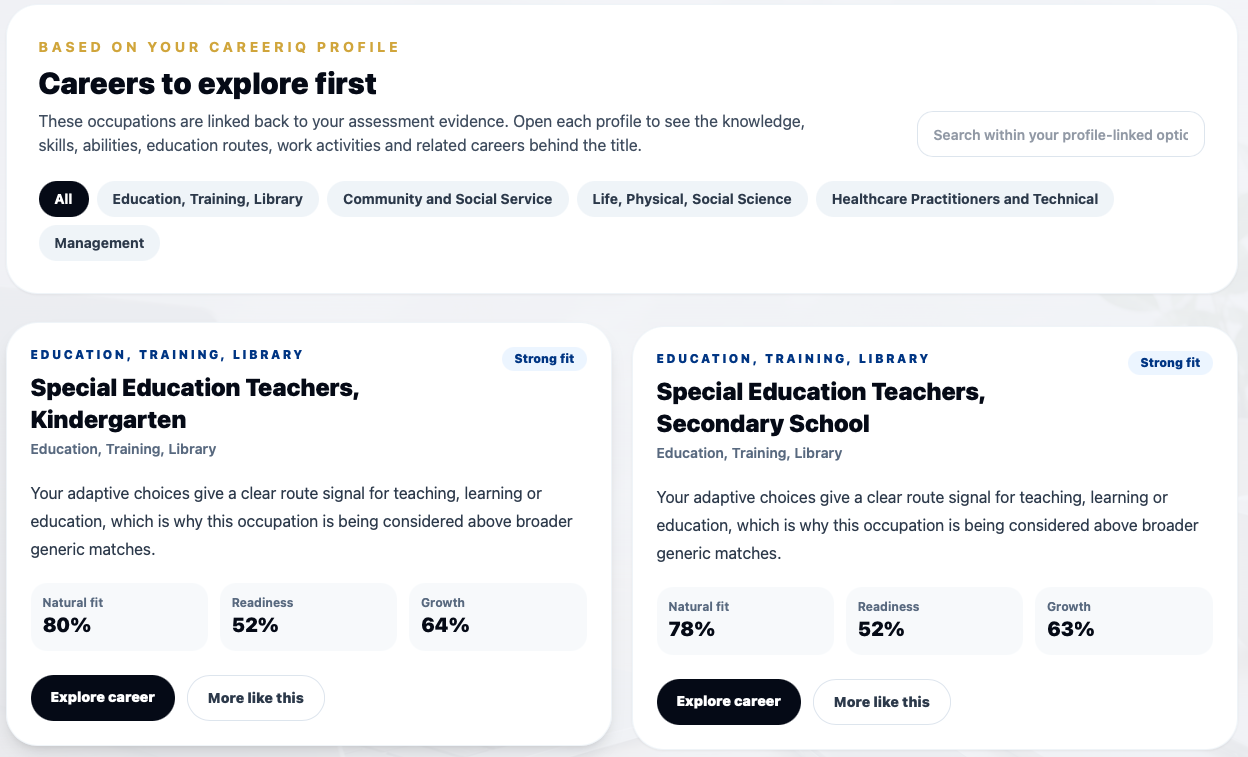
Explore with context
Compare options before you commit to a direction.
Career Explorer
Explore careers that actually fit you.
Career Explorer helps students discover career paths, compare options and understand what different careers involve before choosing subjects, courses or next steps.
Explore career pathways
Compare directions
Understand study routes
Save future-fit favourites
LearnLab
Discover how you learn best.
LearnLab helps students understand how they take in, remember and apply information. It gives Luma a Learning Guide that becomes more accurate as the student uses CareerMap.
Personal Learning Guide
Luma adapts the way it teaches.
Learning Space
Turn your notes into a personal study buddy.
Upload notes, slides, PDFs, worksheets or old test papers into Study Spaces. CareerMap reads the material, organises chapters where possible and helps your coach teach it back in a way students can understand.
Upload material
Select chapters
TeachMe / Mock Test / Homework Help
Improve
Study Spaces
Create subject areas for Biology, Maths, Accounting, English, exam preparation or any topic you need.
Smart material reading
Upload PDFs, Word, PowerPoint, Excel, text or ZIP files. CareerMap keeps the learning content, not a cloud-drive copy of every file.
Chapter split
Large notes and textbooks can be split into chapters or sections so you can select exactly what to learn.
TeachMe
Your coach turns selected material into an interactive lesson with examples, memory checks and boosters.
Mock Tests
Create practice tests from selected notes or chapters, choose question style and review every answer afterwards.
Homework Help
Upload homework and get step-by-step guidance. Your coach teaches the concept, checks your thinking and never does the work for you.
Homework guardrails
Support that helps students learn — not cheat.
Homework Help turns homework into a TeachMe-style session. Luma explains, asks questions, checks attempts and guides the student through the thinking without giving a submission-ready answer.
Homework Help session
Learn the method. Try the next step.
1. What is the question asking?
2. Which concept do you need?
3. Try your next step and Luma checks it.

InterviewMe
Practise before the real interview and improve after every answer.
InterviewMe
Practise interviews before they matter.
InterviewMe helps students practise answering interview questions, record responses and get coaching tips so they can improve before interviews, presentations or applications.
Luma
Meet Luma, your CareerMap companion.
Luma helps students reflect, study, practise and plan. Students can type or talk to Luma, ask for guidance, create TeachMe sessions, build mock tests, get homework support and prepare for interviews.
Try Luma
Live CareerMap voice demo
Click Start voice chat, allow your microphone, then speak naturally. Luma will reply by voice and text. The public demo gives three full answers; the next response invites you to sign up or contact us.
Public demo usage may be limited by IP address to prevent abuse.
Luma
Hi, I’m Luma. Click Start voice chat and ask me how CareerMap can help with career choices, Learning Space, TeachMe, mock tests, homework help or InterviewMe.Career Guide
A conversation that helps evidence make sense
Pattern check
This may point towards career worlds that combine people insight, practical usefulness and structured problem solving.
Ready to start?
Build your future with CareerMap.
Start with Career Mapping, explore possible directions, use LearnLab to understand how you learn, then let Luma help you study, practise and prepare.